Where Photographers and Retouchers Find Clients in 2026: 10 Channels That Actually Work
Where Photographers and Retouchers Find Clients in 2026: 10 Channels That Actually Work
Most photographers and retouchers hit the same wall. The shooting and editing skills are there, the portfolio looks decent, but the inbox is empty. Friends and family have already been photographed, t
Why a photographer has no clients and what to do about it
Most professionals get stuck on one or two channels, usually people they know and a single social network, and hit a ceiling. When word of mouth runs out of steam, there are no orders and panic sets in. A system works differently: 3-4 channels run at the same time, each one bringing its own trickle of leads, and together they add up to a steady flow. If one channel dips, the others keep you booked.
It is important to separate two worlds right away. Portrait photography (family, beauty, weddings, personal branding) and product photography for marketplaces plus retouching are different markets with different channels, different price points and different sales logic. Demand for product photos and retouching for Amazon, eBay, Etsy and Walmart Marketplace is many times higher in 2026, because there are hundreds of thousands of sellers and every one of them regularly needs new listings, infographics and editing. This is a market of repeat orders, not one-off jobs. For each channel we will note who it suits better.
One more basic idea: the client is not buying a photograph, they are buying a result. A seller wants a higher listing conversion rate and more sales, a bride wants emotion and beautiful memories, a brand wants recognition. The more precisely you put that result into the client's own language in each channel, the less each client costs you.
Three real reasons there are no orders
When a professional says "I have no clients", in 9 cases out of 10 the reason is one of three, and none of them is about the quality of the work.
- Nobody knows you exist. Perfect color grading brings in no clients if only three friends know about it. This is a reach problem, and it is solved by acquisition channels, not by retouching courses.
- It is unclear what exactly you sell. A profile full of beautiful but mismatched frames (a few weddings, a bit of food, a few products) sells nothing. A seller can't tell whether you will help with their listings specifically. Clear positioning for a niche raises conversion several times over.
- There are no repeat touchpoints. Someone saw you once, wasn't ready, left and forgot. Without a reminder system (content, a client list, direct messages before the season) you lose the people who almost bought.
Money or time: what you pay for a client with
You always pay for a client with either money (ads, paid promotion of a listing) or time (content, direct messages, running communities). For a beginner with no budget it makes sense to lean on channels that cost time: classifieds with free posting, direct outreach to sellers, social media. Once you have a stable flow and the economics are clear, part of that time gets replaced with money so you can scale. The main thing is to know the cost per client for each channel: how many hours or dollars go into one paid order.
The funnel in plain words
Any channel is a funnel with four stages: they saw you, got interested and clicked, wrote to you, paid. At each stage some people drop off. Your job is not to push more people into a leaky funnel, it is to find out exactly where it leaks. If there are lots of views and few click-throughs, the offer or the preview is weak. If lots of people write and few pay, the problem is the price or the way you handle the conversation. Once you count every stage, you can see what to fix, and the complaint "I have no clients" turns into a concrete task.
How many touchpoints it takes before the first payment
Hardly anyone buys on the first touch. From experience with cold demand, the average seller makes a decision after 3-5 contacts: saw a post, visited the profile, read a case study, received a personal message, got a reminder. That is why channels need not only to be launched but also linked together: someone who came from a classified ad sees your social media, stumbles on case studies there, and gets a sample redo in a direct message. The more touchpoints there are, the cheaper and warmer the sale. One isolated channel almost always loses to a combination of three, even when the total effort is the same.
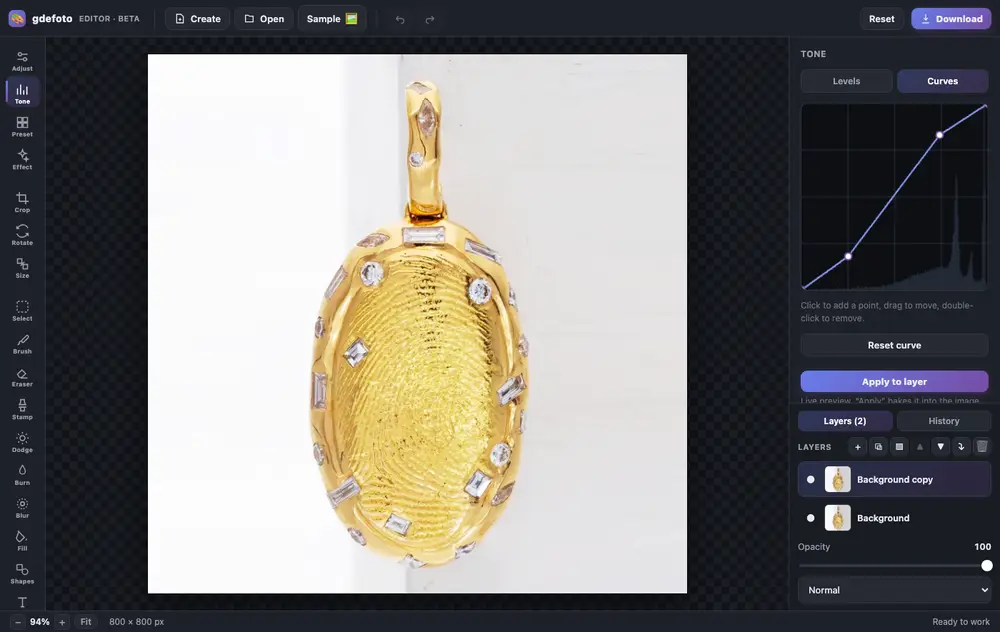
Crop, fix the light with curves, clean up with the clone stamp and add a caption. All in one tab, no install and no sign-up.
- Layers and masksBlend modes, opacity, masks painted with a brush or made from a selection.
- Light and colourLevels, curves, exposure, contrast, saturation and warmth.
- RetouchingClone stamp, dodge and burn, blur, brush and eraser. Crop, rotate and resize.
- AI built inColorize, restore, remove the background, upscale and sharpen: the result is added as a new layer.
- Text and shapesCaptions in the font you choose, rectangles and circles over the photo.
- In your browserNothing to install, no account. Full history with undo.
- Product photos: crop, brighten the background with levels, remove dust with the clone stamp.
- Old photos: restore with AI, colorize and add a caption.
- Social posts: a canvas from a size template, your shot and text on top.
Editing is free. Download is watermarked; remove the mark for $2.99.
Social media and content: a foundation that works for years
Why content is the base, not an add-on
Social media is not about likes, it is about trust before the first contact. When a potential client sees your work, your case studies and the way you think about the craft, they arrive already warmed up and barely haggle. Content works as a compounding asset: one successful post can bring in leads for months, and the portfolio in your profile sells around the clock without you.
What exactly to post
- Before-and-after case studies. For a retoucher and a product photographer this is gold. Show the seller's original phone shot and the final listing image. Conversion numbers, if the client shared them, add weight.
- The process. Behind the scenes of a shoot, how you light a bottle or a piece of jewelry, how you clean up a background. People love watching work get done.
- Value for the client. Short breakdowns: why a listing isn't selling, what's wrong with the infographics, how to shoot a reflective object at home. This is how you become an expert in sellers' eyes.
- Reviews and results. Screenshots of thank-you messages, a listing climbing in rank, repeat orders.
- A face and a personality. People buy from people. A little personal content makes you a living human, not a faceless account.
A weekly content plan that doesn't burn you out
The main reason people drop social media in the second week is the lack of a plan. Figuring out what to post every single time is agonizing. Set up a simple grid of four recurring formats and rotate through them.
- Monday, a before-and-after case. One product, two frames, a short caption with the result.
- Wednesday, something useful. One tip for a seller: how to shoot a shiny product at home, what marketplaces require of the background, how not to wreck the color.
- Friday, process or behind the scenes. A short vertical video of you cleaning up a background or building an infographic.
- Sunday, a review or something personal. A screenshot of a thank-you message or a candid post about yourself and how you approach the work.
Four posts a week in preset formats take 20-30 minutes a day, not a second job. Shooting content in batches (filming the process for three posts at once) saves even more time.
How to run it so it brings results
- Pick 1-2 platforms and build them up instead of spreading yourself across five at once. For product photography and retouching, platforms focused on short video and visuals work well, plus professional communities.
- Post regularly, at least 3-4 times a week. Algorithms love consistency, and so does the audience.
- Put a call to action in every post: send me a DM, I'll quote your listing for free, send me a link to your product.
- Shoot short vertical videos of the process, they deliver the cheapest reach in 2026.
- Pin your services, prices or a price range, examples and a way to contact you in your profile. The profile has to sell without you.
How to set up a profile that sells
Someone who comes from a post decides in 5-10 seconds whether to stay or leave. In that time the profile has to answer three questions: what you do, who it is for and what to do next.
- Bio. Not "photographer and retoucher" but something specific: product photography and retouching for Amazon and Etsy sellers. Listings that sell. A niche in the bio filters out the wrong audience and attracts your own.
- Pinned posts. Three to five of your best before-and-after cases at the top, not random frames. The first screen is your storefront.
- Contact. A message button and a link to a messenger. If a client has to hunt for a way to reach you, they won't reach out.
- Prices. At least a range in a pinned post or in your first reply. Hiding the price means collecting conversations with people who find it too expensive in principle.
Common mistakes on social media
- Posting beautiful frames with no caption and no call to action. It looks nice but doesn't sell, because it is unclear what to do next.
- Mixing weddings, food, products and cats in one profile. Blurry positioning kills conversion.
- Quitting after two weeks without seeing any leads. A compounding channel doesn't pay back instantly, and that is normal.
- Chasing likes instead of inquiries. A thousand likes from fellow photographers do not equal one paying seller.
Pros and cons
- Pro: free in terms of money, the asset grows, it warms the client up in advance, it scales.
- Pro: it suits product work and portraits equally well.
- Con: a slow start, the first noticeable leads often come after 2-3 months of regular work.
- Con: it takes discipline and time for content, which is a second job on top of shooting.
How many clients it really brings
Over the long run this is one of the most powerful channels. At the start, 0-2 clients a month; after six months of active posting, 5-15 inquiries a month is quite realistic, and with a good profile and niche, even more. The main thing is not to quit in the second week when there is no response.
How to count the funnel
Count: post reach, profile visits, people who sent a DM, people who made it to payment. If out of 100 people who viewed the profile 3-5 write and 1-2 buy, that is a normal conversion rate. If they write but don't buy, the problem is the price or the way you handle the conversation, not the content.
What to shoot on a phone if you have no camera
A common beginner's fear: no expensive gear means nothing to show. For product work and social media content, a modern phone covers 90 percent of the tasks. All you need is even daylight by a window, a white sheet of poster board or a photo backdrop as the base, and a tripod for a few dollars. Shoot the product in diffused light with no direct sun, and clean up the background later in editing. For short process videos, a phone is the only thing you need at all. What matters to a seller client is the result on their listing, not the brand of your camera, so you don't have to invest in expensive gear before the first money comes in.
Do not want to fiddle with it? Hand the photo to a retoucher
Automation does not fix everything: a difficult frame, a photo that matters, an old print off a scanner. Where the algorithm gives up, a person works the picture layer by layer in Photoshop, by hand.

 BeforeAfter⇆
- Bring back sharpness in the face and eyes
- Remove noise and artefacts without plasticising the skin
- Fix colour, contrast and a broken exposure
- Remove scratches, stains and creases from an old scan
- Return a file large enough to print
- Price per photo$10
- Turnaroundwithin 24 hours
- Deliveryto your email
- If we cannot do itmoney back
We will finish your photo by hand
A studio retoucher fixes what automation cannot: sharpness, face, colour, defects. Pay first, then simply send the photo and tell us what you need. If we cannot do it, you get your money back.
- Manual photo retouching$10
Classifieds, local listings and service marketplaces: fast, hot leads
Classifieds: an underrated channel with hot demand
Many photographers wince at the mention of Craigslist or Facebook Marketplace, and they shouldn't. People come to classifieds with a specific task and a willingness to pay right now. Marketplace sellers look there in large numbers for product photography and retouching, because they need to get their listings done quickly and inexpensively. For a beginner it is the fastest way to land the first orders, and sometimes an inquiry arrives on the very first day the ad is up.
How to get started with classifieds
- Create separate ads for each service: product photography for Amazon, product photo retouching, infographics for listings, background removal. The more specific the headline, the hotter the lead.
- Fill the ad with before-and-after work, a price or a range, and a turnaround time. A price in the ad filters out the wrong audience and saves your time.
- Use the keywords sellers search for: Amazon listing images, photos for marketplaces, product photo editing, Etsy listing photos.
- Reply fast. On classifieds, response speed wins, and an hour later the client has already written to five other people.
- Paid promotion of an ad pays off if the niche is competitive. Start with a free posting and boost it once you understand your conversion rate.
How to write an ad that hooks
On classifieds the first screen decides everything: the cover photo, the headline and the first lines. Let's go element by element.
- Cover. Use your strongest before-and-after frame, not a logo. A dark phone snapshot next to a clean image on a white background sells better than any text.
- Headline. Specific and with a keyword: Product photography for Amazon and Etsy, photos on a white background. A vague "photo services" gets lost in the results.
- First lines. Lead with the result for the client: clean images on a white background, infographics, editing, ready to upload to the marketplace. Not about you, about their task.
- Price. State a "from" amount per unit, for example from $3 per edited photo, from $15 per listing. Specifics filter out the people looking for a freebie.
What prices to set at the start
A beginner needs to avoid undercutting all the way to zero, but also not scare people off with studio-level prices. Rough 2026 market reference points for remote retouching and product photography help you hold a range.
| Service | Starting range | When to raise it |
|---|---|---|
| Background removal, photo on white | from $1-$3 per photo | After 20-30 reviews and a steady flow of orders |
| Product retouching for a listing | from $3-$6 per photo | When you are consistently booked |
| Infographic for a listing | from $10-$25 per design | As your portfolio grows |
| Product shoot for a batch | negotiable, based on a per-frame rate | Depends on volume and the studio |
This is not a price list, it is a reference point: real rates depend on the region, the complexity of the product and the volume. The main rule is not to work at a loss for the sake of reviews beyond the first 5-10 orders.
Service marketplaces and aggregators
Besides classifieds there are platforms for finding contractors, such as Thumbtack, where clients post jobs and you respond. There are plenty of orders there for photo editing, listing design and retouching. The downside is that you are competing on price with a dozen other responses, so it is important to stand out with your portfolio and a quick, clear reply, not by undercutting.
Comparing the fast channels
| Channel | Speed of first inquiries | Type of client | Best for |
|---|---|---|---|
| Craigslist | 1-3 days | Hot, ready to pay now | Product work, retouching, local portraits |
| Facebook Marketplace and local groups | A few days | Local, price-driven | Everyday shoots, inexpensive retouching |
| Service marketplaces | The day you respond | Task-focused, compares prices | Retouching, listing design, remote work |
How to handle the conversation so it ends in payment
Half of the inquiries from classifieds are lost not because of price but because of a sluggish conversation. A simple routine raises your close rate.
- Reply within the first few minutes. Speed matters more than perfect wording.
- Ask one clarifying question: how many products, whether they need a white background or infographics, by what deadline. It shows expertise.
- Name the price or the range right away, don't drag it out. People who find it too expensive are better filtered out at the start.
- Offer a quick step: send me one photo and I'll show you a sample redo. A demonstration on their own product closes the deal better than words.
- Put the agreement in writing: what you are doing, for how much, by when, how payment works. It prevents disputes later.
Pros and cons
- Pro: hot demand, fast money, no warming up required.
- Pro: ideal for getting started and for remote retouching for clients anywhere in the country.
- Con: price competition, haggling, and some of the inquiries are junk.
- Con: for premium portraits and personal branding the channel works poorly, because the audience is looking for something cheaper.
How much it brings and how to count it
With 3-5 active ads and fast replies, it is realistic to get 5-20 inquiries a month, of which 2-8 turn into work, depending on the niche and the price. Count responses to the ad, conversations and closed deals. If there are many inquiries but few payments, raise the quality of your conversations and state the price immediately, so you don't waste time on people looking for a freebie.
How to filter out junk inquiries in advance
On fast channels some inquiries are a pure waste of time: people who want it for nothing, ask the price and vanish, or want for $1 what costs $10. A few techniques filter them out before they eat your hours.
- State the price or the range right in the ad. People who find it too expensive in principle are filtered out at the door.
- In your first reply, name the cost and the turnaround right away, don't stretch out the introductions.
- For large orders, take prepayment or at least a deposit. A willingness to pay up front separates the serious from the curious.
- Don't do full-scale free work as a test. One sample redo of one photo at most, and after that it is paid.
Direct outreach to sellers, subcontracting and freelance platforms
Direct outreach to marketplace sellers: the main money channel for product work
This is probably the most underrated and at the same time the most profitable channel for a product photographer and retoucher in 2026. There are hundreds of thousands of sellers on Amazon, eBay, Etsy and Walmart Marketplace, and every one of them regularly needs new listings, reshoots for the season, infographics and editing. These are repeat clients: one seller with a large catalog can bring in orders every month for years.
How to reach sellers
- Find listings with weak photos right on the marketplace: dark phone shots, a messy background, no infographics. These are your ideal clients, they have something to improve.
- Find the seller's contact details: through the brand's storefront, its website, the store's social media, seller communities.
- Write to the point, no fluff: I'm looking at your product listing, the photos could be stronger, competitors with infographics are taking the clicks, I can show you a sample of how it would look. Attach a quick sample redo of one photo, it hits harder than any words.
- Offer a test: one listing at a reduced price or free, so the seller sees the result on their own product.
- After the first order, offer a monthly plan or a package for the whole catalog. Repeat orders are the whole point of this channel.
A template for the first message to a seller
To make it clear what a message that doesn't end up in spam sounds like, here is a working structure. No "Hello, I offer photography services", that gets deleted unread.
Hi! I was looking at your listing for [product name] on [marketplace]. The main image is dark and on a busy background; on white and with infographics it would look more premium and pull in more clicks. I made a quick sample redo of your photo and attached it. If you like it, I can do the rest of your listings the same way. How many products do you have in your catalog?
What works is a combination of three elements: specifics about their listing, a clear benefit (more clicks and sales) and a finished sample on their product. The question at the end draws them into a conversation.
Where to find sellers in bulk
- Niche chats and communities of marketplace sellers in messengers and on forums, there are dozens of them.
- Conferences and webinars on selling on marketplaces.
- The listings themselves on Amazon, eBay, Etsy and Walmart with poor photos.
- Seller analytics services, where you can see catalog size and sales volume.
Which sellers to pick first
Not all sellers are equally valuable. Set priorities so you don't waste touchpoints.
- A broad catalog. 30-300 products means dozens of listings to redo and regular new arrivals. That is repeat work for years.
- Clearly weak photos with live sales. The product sells even with poor listings, so the demand is there, and better photos will bring a quick lift that you can show the client.
- Seasonal niches. Clothing, gifts and decor refresh their listings in batches ahead of big sales. Reach out a month to a month and a half before the season.
- At the start, avoid big brands with a marketing department, they already have contractors and it is harder to get through.
Subcontracting: working for agencies and studios
Product photography studios, listing design agencies and content studios are constantly overloaded and looking for extra hands for retouching and shooting. You do the work, they bring the client. The rate is lower than working direct, but you don't have to look for orders, the flow is stable, and you sharpen your skills on a variety of tasks.
- Put together a short portfolio specifically for product work and retouching, with no weddings and no cats.
- Write to 20-30 studios and agencies offering to take overflow work when they are busy.
- Be reliable: deadlines, accuracy, openness to revisions. In subcontracting, predictability is valued above genius.
Freelance platforms
Classic freelance platforms such as Upwork and Fiverr provide a flow of orders for retouching, editing and listing design from all over the country and abroad. The downside is high competition and beginners undercutting each other. To break through:
- Fill your profile with before-and-after cases, not general statements.
- At the start, take a few orders with reviews as the goal, because reviews are the currency of the platform.
- Respond quickly and to the point, with specifics about the client's task, not with a template.
- Raise your rate gradually, building on your rating and reviews.
Comparing direct-demand channels
| Channel | Order value | Repeat orders | Effort to find work |
|---|---|---|---|
| Direct outreach to sellers | High | Very high | High at the start |
| Subcontracting for studios | Medium | High | Low once you are in |
| Freelance platforms | Low to medium | Medium | Constant |
Common mistakes when reaching out to sellers
- A mass identical mailing with no sample. It goes to spam, and the return is close to zero.
- A long message about yourself and your experience. The seller cares about their listing, not your resume.
- No sample redo. The words "I saw it, it could be improved" without a picture don't convince anyone.
- Dropping the client after the first order. All the profit is in repeat work, and you have to offer it and remind them about yourself.
- A high price for the whole catalog right away. First a test on one listing, then a package.
How much they bring and who they are for
Direct outreach to sellers, done systematically at 20-30 touchpoints a week, realistically brings 3-10 new clients a month, many of whom stay for repeat work. Subcontracting can fill one specialist's schedule completely. All three channels are about product work and retouching, and for portraits they barely work. Count: the number of offers sent, replies, tests that turned into payment, and the share of clients who came back for a second order. It is repeat work that makes this channel the most profitable.
Your own website and SEO: clients who look for you themselves
A website is a channel that brings people with a direct query: product photography for marketplaces, product photo retouching, photographer pricing. They already want to buy, all that is left is to be there to meet them. SEO works slowly, but it creates a flow of inquiries that doesn't depend on social media algorithms and doesn't require daily activity.
- Build a portfolio site with sections for each service and a separate page with prices and case studies.
- For each service, create a page targeting a search query: product photography in your city, retouching for Amazon, infographics for listings.
- Write useful articles that clients search for: how to shoot a product for a marketplace, Amazon photo requirements, how much listing images cost. Articles bring traffic and show expertise.
- Collect reviews and case studies with numbers on the site, it raises trust and conversion.
- Add free online editing tools as an entry point: someone came to remove a background, saw your services and ordered a turnkey shoot.
Which pages to start with if resources are tight
You don't need to build a 50-page site right away. The minimum set that already brings inquiries is four pages.
- Home. Who you are, who it is for, three to five strong cases, a contact button. The first screen answers the question "is this what I was looking for".
- Services with prices. A list of services and clear ranges. The pricing page often converts best of all, because people search for it deliberately.
- Case studies and reviews. Before and after with numbers, screenshots of thank-you messages. Proof removes doubts.
- Contact. A messenger, a form, how the work goes step by step. The easier it is to write, the more people write.
A free online editing tool on the site works like a magnet: someone comes to remove the background from their product photo, gets the result and immediately sees an offer to order a turnkey shoot or retouching. That is how a visitor looking for a freebie turns into a lead with no ad spend.
Word of mouth and referrals
The cheapest and highest-quality channel: clients arrive already trusting you and barely haggle. But word of mouth doesn't appear on its own, you build it.
- Do work that people want to show off. Exceed expectations, throw in one extra edited photo as a bonus.
- Ask for referrals directly: if you liked it, please pass my contact on to sellers you know.
- Introduce a referral mechanic: a discount for a referred client, for both sides.
- Stay in touch with past clients and remind them about yourself before the season.
How to ask for a referral without it being awkward
Many people are shy about asking, and lose the cheapest channel for no reason. A request works if it is specific and comes at the right moment.
- Ask right after praise. The client wrote "thanks, great work", and that is the perfect moment.
- Make the request narrow: not "recommend me to someone" but "do you know any sellers who need good listings".
- Remove the friction: give them a ready-made text and a couple of cases that are easy to forward.
- Add a mutual benefit: a discount both for the client and for the person they bring. That turns a one-time request into a system.
Collaborations with other professionals
You already have adjacent specialists who work with the same clients but don't compete with you. Agree to exchange clients.
- For a product photographer and retoucher: a listing designer, a marketplace account manager, a copywriter, a listing optimization specialist, a paid ads specialist.
- For a portrait photographer: a makeup artist, a stylist, a hairdresser, an event planner, venues and rental studios.
- Agree on mutual referrals or a percentage for each referred client. One good partner can send several orders a month for years.
Niche chats and communities
In messengers and on forums there are dozens of active communities of marketplace sellers, entrepreneurs and local businesses. Your clients are discussing their problems there right now.
- Join groups for Amazon, eBay and Etsy sellers and local business communities.
- Don't spam, help: answer questions about photos and listings, offer real value. The expert who helped for free gets the order first.
- Say what you do in your profile and signature, so interested people write to you themselves.
- Where it is allowed, post your service offer according to the group's rules.
How to behave in groups so you don't get banned
- Value first, selling second. Give 5-10 useful answers before any mention of your services.
- Read the group rules. In some places advertising is banned outright, in others there is a dedicated self-promotion day.
- Don't DM members without a reason, it is a fast track to complaints and a ban.
- Answer photo questions in depth and to the point. One breakdown of why a listing isn't selling brings in more than ten "I offer my services" posts.
Pros, cons and returns
- Website and SEO: the pro is a passive flow of hot inquiries and an asset that lasts. The con is a slow start and the need to invest time or money. Returns: 2-15 inquiries a month over the long run.
- Word of mouth: the pro is that it is free and high quality. The con is that it is unstable and doesn't scale quickly. Returns grow with the number of happy clients.
- Collaborations: the pro is warm leads at no cost. The con is that you have to build relationships. Returns: several orders a month from an active partner.
- Chats and communities: the pro is direct access to your target audience for free. The con is that it takes time and tact, and it is easy to get banned for spam.
Cold outreach and direct messages are an active channel where you go to the client yourself instead of waiting. For product work and retouching it works great in combination with direct outreach to sellers: you find stores with weak photos and write to them personally. The main rule is no mass spam with identical text. Every message starts with specifics about the client: I'm looking at your listing, here is what could be improved, here is a quick sample. The conversion rate of a cold DM with a sample redo is several times higher than that of a template mailing. Realistically, out of 100 targeted personal messages you get 5-15 replies and 2-6 clients, and some of them stay for repeat work. For portraits, cold DMs work less well, and content and referrals perform better there.
How not to burn out on cold outreach
Cold outreach is exhausting if you do it chaotically. Turn it into a short daily ritual, not a weekend marathon.
- The daily quota: 5-10 personal messages, no more. That is 30-40 minutes, but over time it adds up to 25-50 touchpoints a week.
- Prepare samples in batches. Once a week, pick 10 weak listings and make quick redos for them in advance.
- Keep a simple spreadsheet: who you wrote to, when, whether they replied, whether a reminder is needed. Without tracking you lose the people who didn't reply the first time.
- Follow up once after 3-5 days. A second polite touch often closes those who simply scrolled past the first one.
How to build a system out of channels instead of chaos
Now for the main thing: how to assemble these channels into a system and not chaos. Don't try to launch everything at once, you will burn out within a month. Take three channels: one fast one for money right now (classifieds or direct outreach to sellers), one compounding one for the future (social media or a website with SEO) and one warm one (word of mouth and collaborations). The fast channel feeds you while the slow ones get going. Every month, look at the numbers for each channel: how many leads, how much money, what the cost per client is in time and money. Strengthen what brings results and switch off what eats time for nothing. In six months to a year you will have 3-4 working channels that keep you steadily booked, and seasonal dips will stop being a disaster. Separately, keep a client list and remind people about yourself before the big sales seasons, because repeat orders are always cheaper than new ones.
A 90-day plan for a beginner
So you don't drown in choices, here is a clear sequence for the first three months.
- Weeks 1-2. Put together a portfolio of 5-10 before-and-after cases for product work and retouching. Without them no channel will take off.
- Weeks 2-4. Launch the fast channel: 3-5 classified ads and daily DMs to sellers. The goal is the first paid orders and the first reviews.
- Weeks 4-8. In parallel, start social media with a content plan of four formats. The compounding channel begins to warm up the audience.
- Weeks 8-12. Add the warm channel: ask your first clients for referrals, write to adjacent specialists about collaborations, and if you have time, build a four-page website.
Which numbers to count every month
| Metric | What it shows |
|---|---|
| Leads per channel | Where inquiries really come from |
| Payments per channel | Which channel brings money and not empty conversations |
| Cost per client (time or dollars) | What is worth strengthening and what to switch off |
| Average order value | How much one client brings in |
| Share of repeat orders | How stable your income is |
After a couple of months the numbers will tell you where to put your effort. A channel that eats time and brings no payments gets switched off without regret. A channel with repeat work and a low cost per client gets strengthened first.

We will edit a sample from your catalog for free
For online stores, manufacturers, brands and wholesale suppliers. Send 1-3 product photos and we will return them professionally edited, with a price quote for your whole catalog.
This is a b2b, volume format. We do not process personal photos (portraits, events, documents) here.
Request received
We will edit your sample and send the result with a catalog quote within one business day.