Old photo restoration by a retoucher
Creases, cracks, stains, faded faces. We restore by hand, layer by layer, and deliver a print-ready file. Fixed price, online payment, ready in 3 business days. If we cannot improve it, you get a refund.
One photo
- Creases, cracks, scratches and stains removed
- Faces and details rebuilt from what survived
- Tone evened out, contrast and sharpness restored
- Print-ready file up to 30×40 cm, 300 dpi
Photo + colour
- Everything from "One photo"
- Manual colorization: skin, clothing, background, details
- Two files: restored black and white plus colour
- Print-ready file up to 30×40 cm, 300 dpi
Family archive
- Restoration of 5 photos
- Colorization included for each
- Consistent style and tone across the archive
- Print-ready files in one download
3 business days from payment. One revision based on your comments is included. Originals and results are kept for 30 days, then deleted.
What we do
- Remove creases, cracks, scratches, dust and stains
- Join torn pieces if all parts are on the scan
- Rebuild faces, hair, clothing and background from surviving details
- Rebuild lost areas: a torn corner, a hole, a stain on a tree, a wall or the sky, a cut-off edge
- Bring contrast back to a faded print, remove yellowing and damp stains
- Colorize by hand, plausibly for the era and materials
- Prepare the file for print: clean edges, level the horizon, 300 dpi up to 30×40 cm
A studio retoucher does the work, not an automatic filter. We use AI as a tool, a person always finishes the job.
What we do not do
- We do not invent a face that is not on the photo: torn off, burnt out or covered. We restore only what left some detail
- We do not sharpen what is blurred in the original. Slight softness can be tightened, a smudge will not become a portrait
- We do not enlarge small phone-screen photos to poster size: prints larger than 30×40 cm only from a good scan
- We do not guarantee exact colours when colorizing. We do not know the colour of a dress or eyes, we make it plausible. If you know, write it in the order
- We do not add or remove people, change appearance or retouch documents
If your case is on this list, the retoucher refunds the payment right away and you get an email with the reason.
How it works
Before and after
Drag the slider. Original on the left, restored on the right.
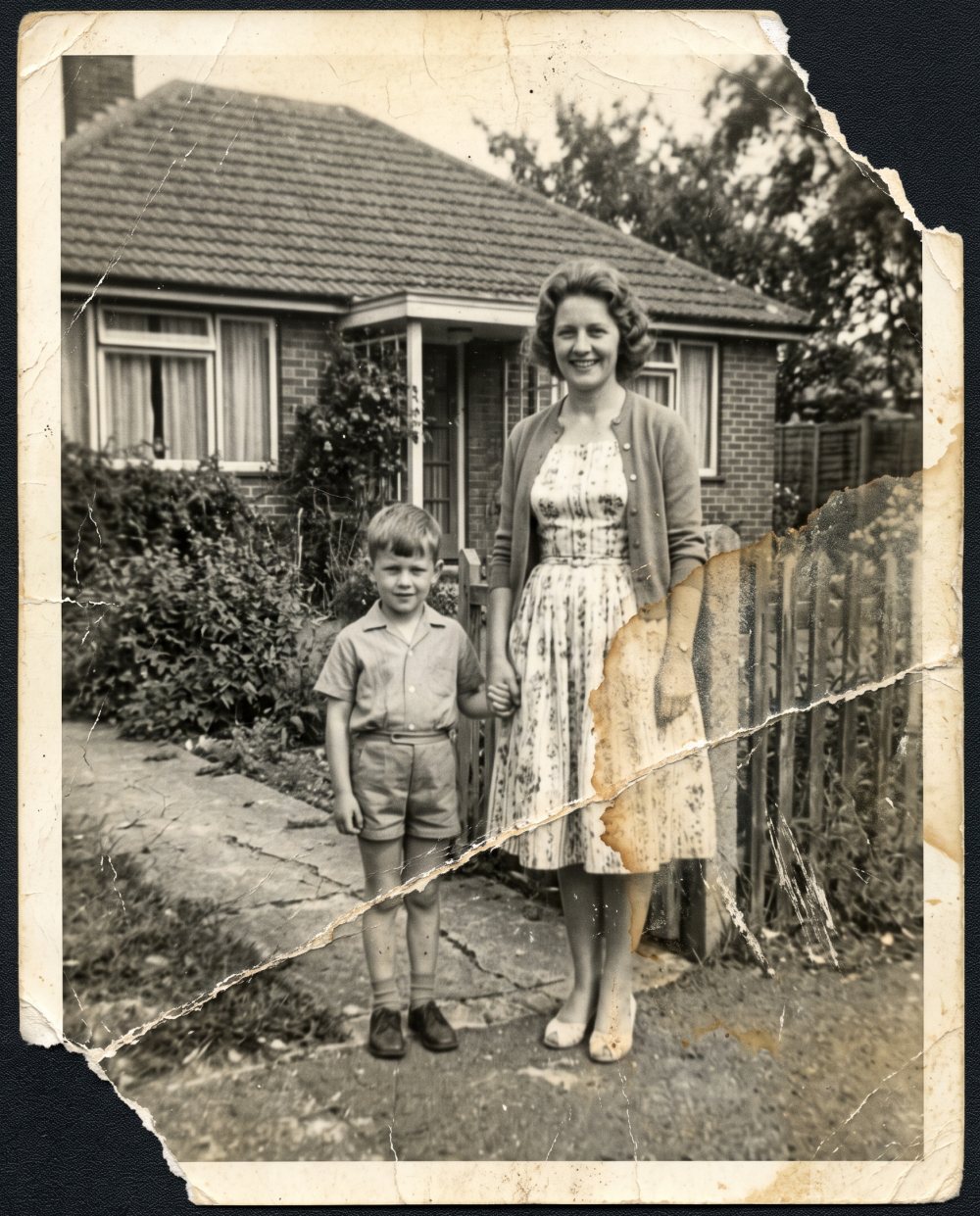
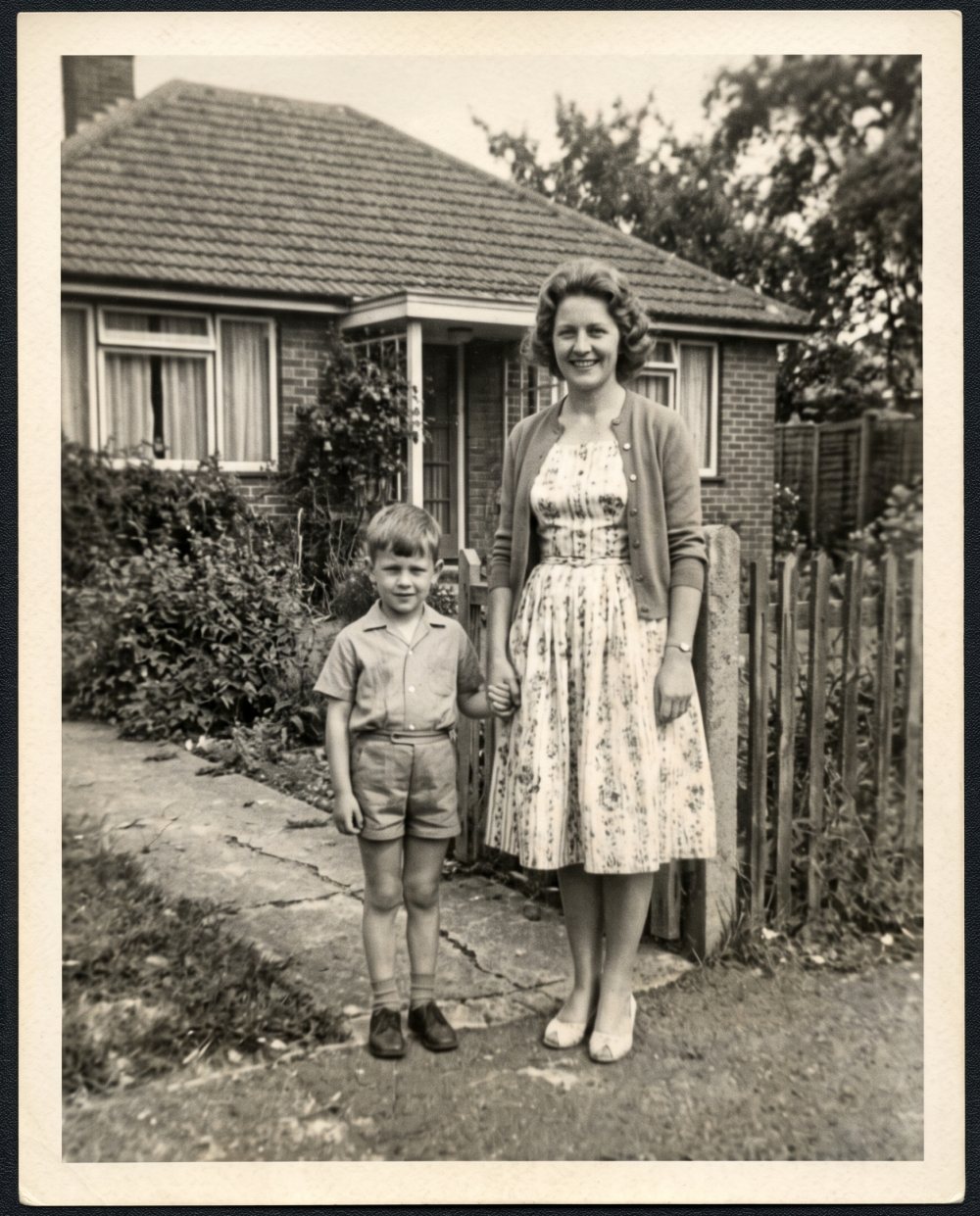 beforeafter
What damage we fix
Almost every old print arrives with a mix from this list. The retoucher works in layers: geometry and joining first, then cleaning, then tone, and finally faces and details. That way one defect does not hide another.
| Damage | What we do | What you get |
|---|---|---|
| Creases and cracks | Remove the fold along its whole length and rebuild the texture under it | Smooth surface, the trace is invisible even in a 30×40 print |
| Torn corner, hole | Rebuild the lost area from its surroundings: wall, tree, sky, fabric, pattern | Full frame with no empty spots |
| Torn into pieces | Align the fragments from the scan, blend the seam, fill the gap | A whole photo, if all pieces are there |
| Fading, yellowing | Bring back solid blacks and clean highlights, remove the paper cast | A contrasty frame, like a fresh print |
| Damp stains, mould | Remove the marks and spots, rebuild what is underneath | Clean field, faces without stains |
| Scratches, dust, specks | Cleaned by hand without smearing the film grain | Living texture, no plastic look |
| Slight softness | Tighten facial details: eyes, lips, hair | A readable face; heavy blur cannot be fixed, see below |
| Black and white print | Manual colorization in the colour packs | Two files: black and white plus colour |
One rule without exceptions: we restore only what left some detail. Background, clothing and surroundings we rebuild without hesitation. A face that is not on the photo we will not invent, and we refund such an order.
How to scan or photograph the print
Two thirds of the result depends on what you send. Five minutes on a proper scan save half of the retoucher's work and noticeably improve the outcome.
- Scanner: 600 dpi for prints up to 10×15 cm, 400 dpi for larger ones. JPG at maximum quality or PNG. Turn off auto-correction and "dust removal" in the driver: they smear the details we need.
- Phone: lay the print on a table by a window in daylight, no direct sun and no flash. Hold the phone level above the photo, edge to edge, and leave a small margin. Take two or three shots and attach them all.
- Do not flatten creases or tape torn pieces: tape damages the print over time, and we remove the fold in the file. Scan torn pieces separately on a white sheet.
- Do not send screenshots or photos from messengers: the image is already compressed and there is little detail left to work with.
- Take a framed print out from under the glass: glass adds glare and softness.
What you receive
A link to the finished files arrives by email. In the "One photo" pack it is a JPG at maximum quality. In the colour packs there are two files: the restored black and white and the colour version, each separately. The size is print-ready up to 30×40 cm at 300 dpi if the original allows; a small scan will not become a large print, and we say so honestly.
The file can go to any photo lab or be printed on canvas: the resolution is enough. If the restoration is for a date, allow 3 business days for the work and another day or two for printing. How to turn the photo into a gift is covered in the article photo restoration as an anniversary gift.
The download link lives for 30 days, after that originals and results are deleted. One revision based on your comments is included; the button for it is in the email with the result.
Free AI or a paid retoucher
Not every photo needs a person. The site has an automatic AI photo restoration: the preview is free, the clean file costs $0.99. An honest comparison so you do not overpay:
AI is enough
- Noise, grain, slight softness of the face
- Mild fading without stains
- Small scratches on the background
- You want a quick look at what can be recovered at all
You need a retoucher
- Tears, holes, torn corners
- Stains and cracks across faces
- Joining a photo from pieces
- Colorization for print where clothing and background details matter
- Several photos in a consistent style for an album
A common scenario: you ran the photo through AI, the face did not come out or artifacts appeared. Then send the original scan here, not the AI result: the retoucher needs the original.
How we colorize
Colours are chosen by era and material: skin tone by age and light, fabric by texture, uniforms and insignia from references, interiors and nature by the season in the photo. Colorization goes in layers on top of the already restored black and white file, so you get both versions.
What we cannot know is the colour of eyes, a dress or a house. If you remember, write it in the "What matters in the photo" field when ordering: "grey eyes, blue polka dot dress, yellow house". The retoucher will make it exact, not just plausible. If you are not sure colour is needed, try the automatic online photo colorizer: it gives an idea of the result in a minute.
Frequently asked questions
How much does restoring one photo cost?
$19 per photo without colour, $25 with colorization, $89 for a pack of 5 photos with each one colorized. The price does not depend on the amount of damage, no estimate needed.
How do I photograph the print if I have no scanner?
Lay the photo on a table by a window, no direct sun, hold the phone level above it and shoot without flash. Two or three shots are better, attach them all. A 600 dpi scan is always better if you have the option.
In what form do I get the result?
A JPG at maximum quality and, for colorization, separate black and white and colour files. Print size up to 30×40 cm at 300 dpi if the original allows. The download link is valid for 30 days.
What if I do not like the result?
The email with the finished files has a link "write to the retoucher what to fix". One revision is included in the price. If the photo cannot be restored, the retoucher refunds the payment right away and you receive an email with the reason.
There are several photos on one scan, is that one order?
No, we count photos, not files. Two photos on one scan are two orders or the "Family archive" pack. Write in the "What matters" field that there are several photos.
Can I send more than 5 photos?
Yes, pay for the "Family archive" pack as many times as needed: each order goes to the retoucher separately and arrives in a separate email.
I only have film or a negative
We need a scan of the negative converted to positive; an ordinary flatbed scanner cannot do that. If you only have the film, have it scanned at a photo lab and send us the file.
The photo has already been through AI, can I send that?
Send the original scan. The AI result has already lost some detail and added its own; the retoucher works worse with it than with the original.
Will you make it in time for a date?
3 business days from payment, usually faster. There is no rush option, so allow a week including printing.
How do I pay and do I get a receipt?
By card in the order window, payment is processed by Stripe and the receipt arrives by email. Terms are in the terms of service.
What happens to my photos after the work?
Originals and results are stored for 30 days, then deleted. We never publish anything without your permission.
Is there a free option?
Yes, an automatic one: restore a photo with AI, the preview is free. For simple cases it is enough. Manual restoration is needed when AI did not recover the face or the damage is serious.
Save the photo before it fades completely
Attach the photo, pay, and in 3 business days the print-ready file is in your inbox.
Restoration order
The finished files arrive by email in 3 business days.