Portrait Retouch Online
Gentle skin retouch: fewer pimples, less redness and shine, a more even tone. Still you, just with smoother skin: facial features, eyes, hair and background stay as in the photo
Upload a portrait
Gentle skin retouch: fewer pimples, less redness and shine, a more even tone. Facial features, eyes, hair and background stay the same.
What the retouch does
- Finds the face and selects the skin: forehead, cheeks, nose, chin and neck.
- Removes pimples, small spots and redness while keeping the skin texture, no plastic look.
- Removes oily shine and slightly evens out the tone.
- Makes under-eye bags and shadows softer.
- Slightly reduces yellow on teeth.
What stays the same
- Face shape, eyes, brows, lips, nose and age: pixels are not moved and the face is not redrawn.
- Hair, clothes and background.
- Image size and framing.
How to retouch a portrait
- Choose the strength: light or medium.
- Upload a portrait: JPG, PNG or WebP up to 25 MB.
- Click "Retouch": the result is ready in a few seconds.
- Check the preview and download the file without a watermark for $2.99.
Questions
Will I still look like me?
Yes. The tool does not redraw the face: it only works on the skin on top of your photo. Eyes, brows, lips, face shape and age stay as in the photo.
What is the difference between light and medium?
Light removes visible spots and shine, the skin stays almost as it was. Medium evens out tone and texture more. If the result looks too smooth, choose light.
Which photo works best?
A portrait with the face large, in focus, frontal or half-turned. If no face is found, the tool will tell you.
Can I retouch a photo with several people?
Yes, up to the four largest faces in the frame are processed.
How much does it cost?
The preview is free with a watermark. The file without a watermark costs $2.99.
Need a stronger retouch, or a mole, scar or wrinkles removed?
The automatic retouch is gentle and leaves these alone. Order a manual retouch below the result and a retoucher will do it by hand.
How many photos can I do for free?
You can try it free every day without signing in. Signing in with your email gives you more free runs. When the free runs are used up, the tool will offer to sign in or get a pack.
Where is my file after payment?
Right after payment you get a page with a download button. If you entered an email at checkout, the file is also sent by email. Save it within 24 hours: after that we delete the photos. If it does not download, message us in the chat and we will send it by hand.
How long does it take?
Usually from a few seconds to a minute. When many photos are being processed, yours waits in a queue and the tool retries on its own. Keep the page open meanwhile.
Crop, fix the light with curves, clean up with the clone stamp and add a caption. All in one tab, no install and no sign-up.
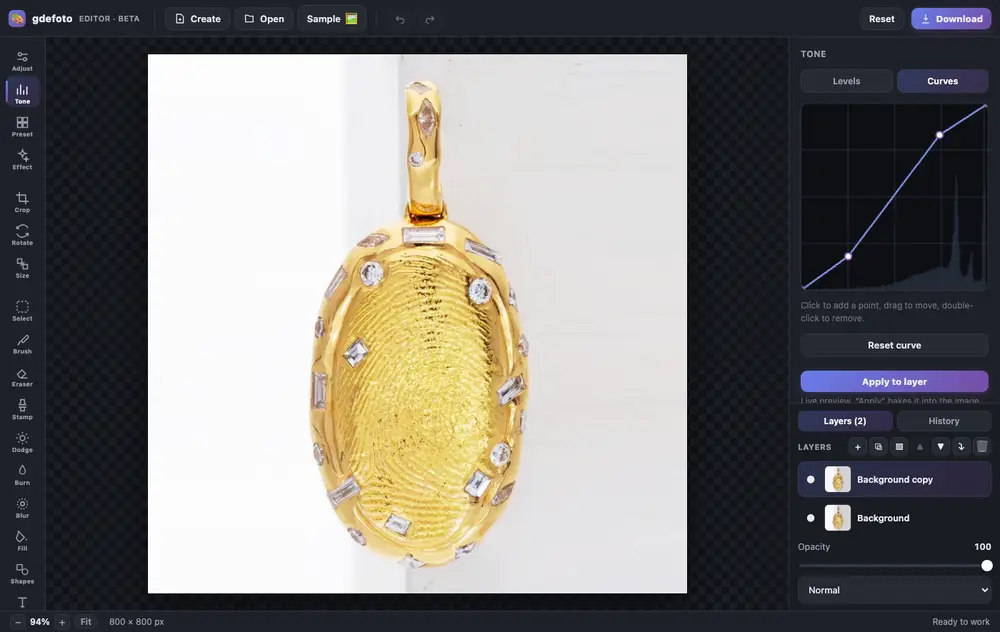
- Layers and masksBlend modes, opacity, masks painted with a brush or made from a selection.
- Light and colourLevels, curves, exposure, contrast, saturation and warmth.
- RetouchingClone stamp, dodge and burn, blur, brush and eraser. Crop, rotate and resize.
- AI built inColorize, restore, remove the background, upscale and sharpen: the result is added as a new layer.
- Text and shapesCaptions in the font you choose, rectangles and circles over the photo.
- In your browserNothing to install, no account. Full history with undo.
- Product photos: crop, brighten the background with levels, remove dust with the clone stamp.
- Old photos: restore with AI, colorize and add a caption.
- Social posts: a canvas from a size template, your shot and text on top.
Editing is free. Download is watermarked; remove the mark for $2.99.