ID photo requirements: background, lighting, glasses and passport photo rules
ID photo requirements: background, lighting, glasses and passport photo rules
ID photo requirements: what every country checks
Almost every authority asks for the same thing in a document photo: a full-face view, even light with no shadows, a plain light background, a neutral expression and a recent picture with no retouching. The details are what differ: the size of the frame, the background colour, the attitude to glasses and how old the picture may be, from one month in the UK to six months in the USA and the Netherlands. This guide starts with the shared rules and then gives the exact figures for each document, taken from the websites of the issuing authorities.
ID photo requirements for the background: chart by document
The background must be plain, even and free of shadows, but the colour depends on the document. White is not always right: a printed UK passport photo is expected on a cream or light grey background, and the Indonesian KTP card uses red or blue.
| Document | Background | Print size | Age of photo |
|---|---|---|---|
| US passport | white or off-white | 2x2 inches (51x51 mm) | up to 6 months |
| UK passport, printed photo | cream or light grey | 45x35 mm (height by width) | up to 1 month |
| UK passport, digital photo | plain light colour | file of at least 600x750 pixels | up to 1 month |
| Schengen visa (Germany as the example) | plain light colour, some visa centres ask for white | 35x45 mm (about 1.4x1.8 inches) | up to 6 months |
| Voter ID, India (Form 6) | white | 4.5x3.5 cm | "recent" |
| KTP, Indonesia | red or blue, by year of birth | taken at the office | taken on the spot |
| Passport and ID card, Netherlands | grey, light blue or white | 35x45 mm | up to 6 months |
The background also has to contrast with your head. Fair hair blends into a white wall, which is why the Dutch photo matrix asks for sufficient contrast between the head and the background, and the UK rules speak of a clear contrast. If your hair is light, a grey or light blue wall is safer wherever the rules allow it. If your hair is dark, avoid dark clothing that merges with it at the shoulders.
ID card photo lighting, expression and head position
The light must be even, with no shadows on the face or on the background, no blown-out highlights and no areas lost in darkness. Every authority in the chart above asks for this.
The Dutch photo matrix goes into more detail than the others: lighting must be uniform on both the face and the background, with no white patches from a flash. It names shiny skin, perspiration, glasses and jewellery among the causes of glare.
In practice this comes down to three things:
- face a window, do not stand side-on to it or with your back to it;
- step one or one and a half paces away from the wall, so the shadow of your head does not fall on the background;
- switch off the phone flash: it causes glare on the forehead and red eyes, and red eye is expressly ruled out in the UK requirements.
Now the face. The expression is neutral, the mouth closed, the eyes open, the gaze straight into the lens. The head is held level, without tilting or turning.
The wording used by different authorities is almost identical. The UK asks for a plain expression, mouth closed, eyes open and visible, with no hair across the eyes. The Netherlands asks for a neutral look straight at the camera, mouth closed, eyes on one horizontal line and shoulders square. India, for the voter ID, asks for open eyes and both edges of the face clearly visible.
A smile showing teeth, a raised eyebrow, a squint or a head leaning towards the shoulder all count as faults. Exceptions are made for small children, covered further down. For a step-by-step home setup, see our guide on taking a document photo at home with a phone.
ID photo requirements for glasses: where they are allowed
There is no single rule, so check the one for your own document.
| Document | Glasses |
|---|---|
| US passport and visa | not allowed; the exception is a medical reason backed by a doctor's statement |
| UK passport | do not wear them if you can manage without; if you must, no tint, and neither frames nor glare may cover the eyes |
| Netherlands | allowed: eyes fully visible, lenses fully transparent, no glare and no shadows from the frame |
| Germany (Schengen) | allowed: no tint and no glare, eyes visible |
The safest option for any of these documents is to take the glasses off. Tinted glasses and sunglasses are not accepted anywhere. If you do keep clear glasses on where they are allowed, lower your chin very slightly or raise the light source a little, then check the shot at full size: a reflection that hides even part of one eye is enough for a rejection.
ID card photo with a head covering: the rule and the exceptions
The head should be uncovered. Almost everywhere there is one exception: a covering worn for religious reasons, and in the UK and the Netherlands also for medical ones.
- USA: a covering is acceptable if it is worn daily for religious reasons and it casts no shadow on the face.
- UK: no head covering "unless it's for religious or medical reasons".
- Netherlands: the head may stay covered for religious or philosophical reasons; there is a separate exception for objective physical or medical reasons, and where there is doubt the applicant may be asked for a doctor's statement.
Even with a permitted covering, the face must be open from the chin to the forehead and at both sides. Caps, hoods, headbands and headphones worn for fashion or comfort do not fall under any of these exceptions.
How recent a photo ID card picture must be: one month or six
The UK is the strictest: a passport photo must have been taken in the last month. The USA, the Netherlands and German consulates set six months. India, for the voter ID, simply asks for a "recent" photograph and gives no period.
The point of the rule is the same everywhere: the photo has to look like you today. If you have grown or shaved off a beard, or noticeably changed your hairstyle or weight, retake the picture even when the period has not yet run out. The UK voter certificate, for instance, stays valid exactly as long as you still resemble your photo.
A practical consequence: do not reuse a file left over from an application a year ago, even if it was accepted then. The date limit applies on the day you submit, not on the day the picture was first used.
ID photo requirements on retouching and filters
You may not alter the image. The USA forbids digital changes to the photo, the UK rules require a picture that has not been altered by computer software, and the Dutch photo matrix includes the item "niet bewerkt", meaning "not edited".
That rules out beauty filters, skin smoothing, changes to the shape of the face and painted-in clothing, and for these three countries it also rules out replacing the background with software. The practical conclusion: for US, UK and Dutch passports, take the picture against a real, even background of the right colour from the start. Cropping the shot to size and bringing the file weight within the limit is fine, because it does not change the image of the face.
Phone cameras often apply portrait enhancement by default. Turn it off before you shoot, together with any background blur mode: a softened outline around the hair is one of the easiest signs of processing to spot.
How to fit an ID card photo to the format online
In the ID photo tool on this site you upload a file or take a picture with your camera, choose the document from the list, and the service crops the shot to the standard, sets the background, corrects the white balance and brings the pixel size and JPEG weight within the limit for that format. It does not retouch the face and does not paint in clothing.
What is worth knowing in advance:
- JPEG, PNG, WebP, HEIC and AVIF files of up to 20 MB are accepted; a short side of 900 pixels or more is treated as normal, and anything under 600 pixels will not pass the initial check;
- the catalogue currently holds 58 formats, and you pick one of them: a custom size cannot be entered;
- the background is set by the format: white for most documents, red or blue for the Indonesian formats;
- the result is a single photo in a file, there is no sheet for printing;
- processing and the preview are free, the clean file for download is paid.
The list includes a US visa (DS-160) and green card format of 51x51 mm, a Schengen format of 35x45 mm, a UK format of 35x45 mm at 600x800 pixels, "United Kingdom: passport (online application)" at 900x1125 pixels with a file of 50 KB to 5 MB, "Netherlands: passport / ID card" at 35x45 mm, an India eVISA format of 50x50 mm and a general "Photo 3×4 cm (ID card, badge, student card)". There is no separate format for the Indian voter ID.
Photo ID card checklist before you submit
Run through these points with the finished picture open at full size. They repeat the shared rules above in the order in which photos are usually rejected.
- Background: plain, the colour your document asks for, no shadow behind the head, no objects or other people.
- Light: even on both halves of the face, no glare on the forehead or on glasses, no red eye.
- Face: full-face view, head level, mouth closed, eyes open, nothing across the eyes.
- Head covering and glasses: only what your document allows.
- Date: taken within the last month for the UK, within six months for the USA, the Netherlands and Germany.
- File or print: the size in millimetres, inches or pixels and the file weight match the figures for your document.
- No filters and no retouching.
Passport photo requirements: USA, UK and Schengen
Passport rules are the most detailed of all document photo rules, and they are where the three big systems differ most: the USA uses a square frame in inches, the UK has separate rules for printed and digital pictures, and Schengen countries share the 35x45 mm frame. The figures below come from the pages of the issuing authorities.
US passport photo: 2x2 inches and a white background
The photo is 2x2 inches, that is 51x51 mm, on a white or off-white background, taken within the last 6 months. The head, from chin to crown, takes up 1 to 1 3/8 inches, which is 50-69 % of the height of the frame.
The rest:
- full-face view, neutral expression, both eyes open, mouth closed;
- no glasses; the exception is a medical reason with a doctor's statement;
- a head covering only if it is religious and worn daily, with no shadow on the face;
- the image may not be altered by digital means.
For the State Department's electronic forms (the DS-160 visa application) the file is square, from 600x600 to 1200x1200 pixels, JPEG, in colour, up to 240 KB. For the green card lottery the size is exactly 600x600 pixels, JPEG up to 240 KB. A scan of a paper photo is acceptable only from a 2x2 inch print at 300 pixels per inch. The lottery has its own checks, described in our article on green card photo requirements.
UK passport photo on paper: 45x35 mm
You need two identical photos, 45 mm high and 35 mm wide. The head, from crown to chin, takes up 29 to 34 mm. The background is plain cream or light grey; white is not named for the printed version.
Requirements for the print itself:
- colour print on plain white photographic paper, with no border;
- professional print quality, the picture sharp;
- no creases and no tears;
- no red eye;
- the photo has not been altered by computer software;
- the picture was taken in the last month.
The photos are separated from each other and placed loose in the envelope; they are not glued or attached to the form.
UK digital passport photo: pixels and file weight
The file must be at least 600 pixels wide and 750 pixels high, and weigh between 50 KB and 10 MB. The background is a plain light colour with a clear contrast to the head. The picture is in colour, sharp, not altered by software and taken in the last month.
The frame must include the head, shoulders and upper body. No other people or objects, no shadows on the face or on the background, no hair across the eyes.
Note the lower weight limit: a heavily compressed file of less than 50 KB will not do. If you prepare the picture in an online service, check the weight of the final file in its properties before uploading it.
Schengen passport photo and visa photo: what consulates have in common
The European Commission puts the requirement in one line: a Schengen visa application is accompanied by a photo that meets ICAO standards. The actual figures come from the consulates, and they are close to each other: a 35x45 mm frame, about 1.4x1.8 inches.
| Country | Size | Face in the frame | Other points |
|---|---|---|---|
| Germany | 35x45 mm | 32-36 mm, 70-80 % of the frame | up to 6 months; glasses with no tint and no glare; no retouching |
| Czech Republic | 35x45 mm | at least 13 mm from the eyes to the chin | no dark glasses, civilian clothing, a head covering for religious or medical reasons |
| Netherlands (passport and ID) | 35x45 mm | 26-30 mm from age 11 | up to 6 months; grey, light blue or white background |
The number of photos is not fixed by one common rule; each consulate names its own. Before you apply, check the document list of your particular consulate or visa centre. Sizes for other destinations are collected in our overview of visa photo sizes and requirements by country.
Passport photo for a child: allowances by age
Children are forgiven their expression and the direction of their gaze, but not the background and not other people in the frame.
- UK: the child is alone in the frame. Under 6, the child does not have to look straight at the camera or keep a plain expression. Under 1, the eyes may be closed and the head may be supported with a hand, but the hand must not be visible. The advice for a baby is to lay the child on a plain light-coloured sheet and take the picture from above.
- Netherlands: there are no requirements for pose and expression for children under 6, and any support must not be visible. Up to and including age 10 the face from chin to crown may be smaller: 19-30 mm instead of 26-30 mm.
The allowances stop there. The size of the frame, the colour of the background, the even light and the date limit are the same for a child as for an adult.
Passport photo for an online form when the office takes its own picture
Some countries ask for a photo file with the online application and still photograph you at the appointment. Russia is an example: the photo uploaded with the application on the state services portal does not go into the passport, it stays in the applicant's file. For the biometric passport the applicant is photographed by an officer at the appointment, and paper photos are not needed.
For the older, non-biometric passport, paper photos of 3.5x4.5 cm are brought as well: three for adults and children from 14, two for children under 14. The image requirements are the usual ones: a white background with no shadows or objects, good light, the face open, no head covering and no uniform. This is also the one case in this guide where glasses stay on: applicants who wear them all the time are told to be photographed in them, without glare, and sunglasses are not allowed. If the application is returned because of the photo, it is filled in again with a new picture.
Passport photo rejected: the usual reasons
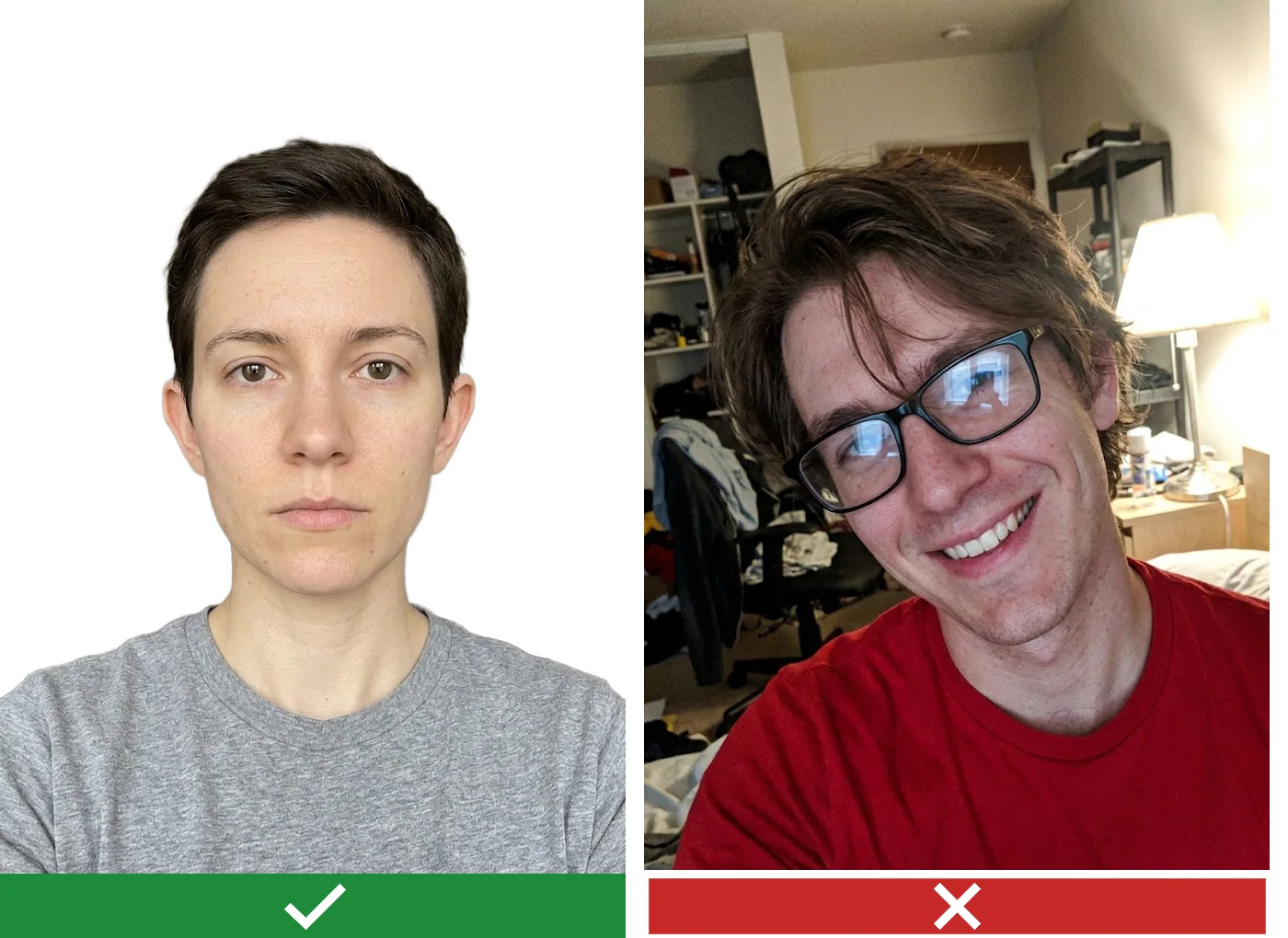
Across the rules above, the same faults come up again and again, and each of them can be checked before you apply:
- the wrong background for the document, for example white on a printed UK photo where cream or light grey is expected;
- a shadow behind the head or on one side of the face;
- glasses on a US photo, or glare on the lenses elsewhere;
- a head that is too small or too large for the frame: 1 to 1 3/8 inches for the USA, 29-34 mm for the UK, 32-36 mm for Germany, 26-30 mm for the Netherlands;
- a picture older than the limit, or one that no longer looks like you;
- signs of editing: smoothed skin, a cut-out outline, a filter;
- a file outside the limits: under 600x750 pixels or under 50 KB for the UK, over 240 KB for the US electronic forms.
Do not want to fiddle with it? Hand the photo to a retoucher
Automation does not fix everything: a difficult frame, a photo that matters, an old print off a scanner. Where the algorithm gives up, a person works the picture layer by layer in Photoshop, by hand.
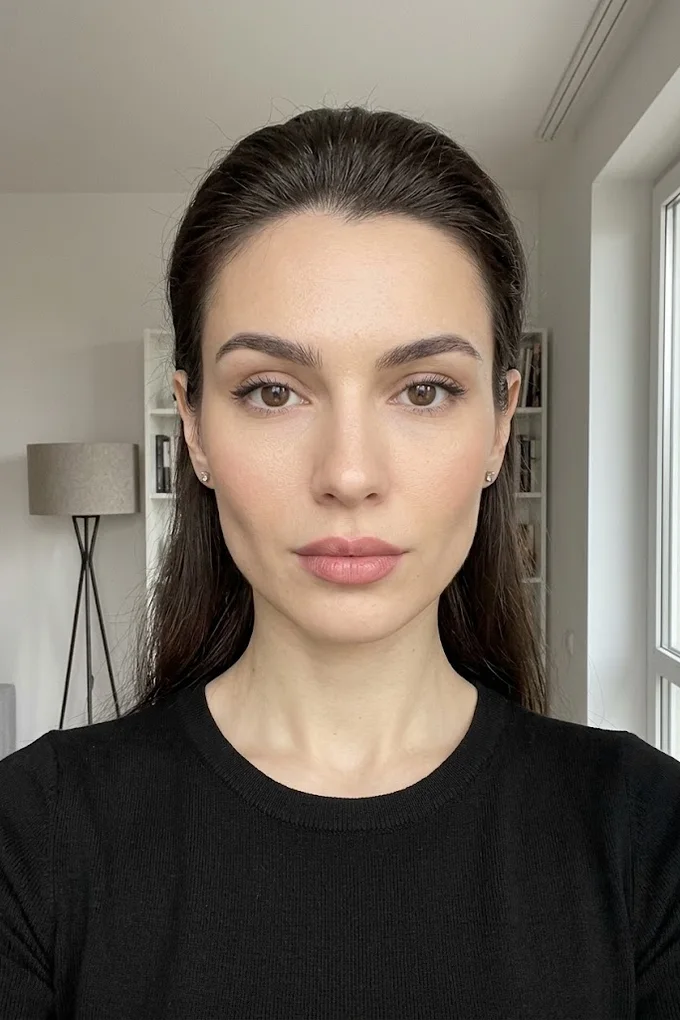
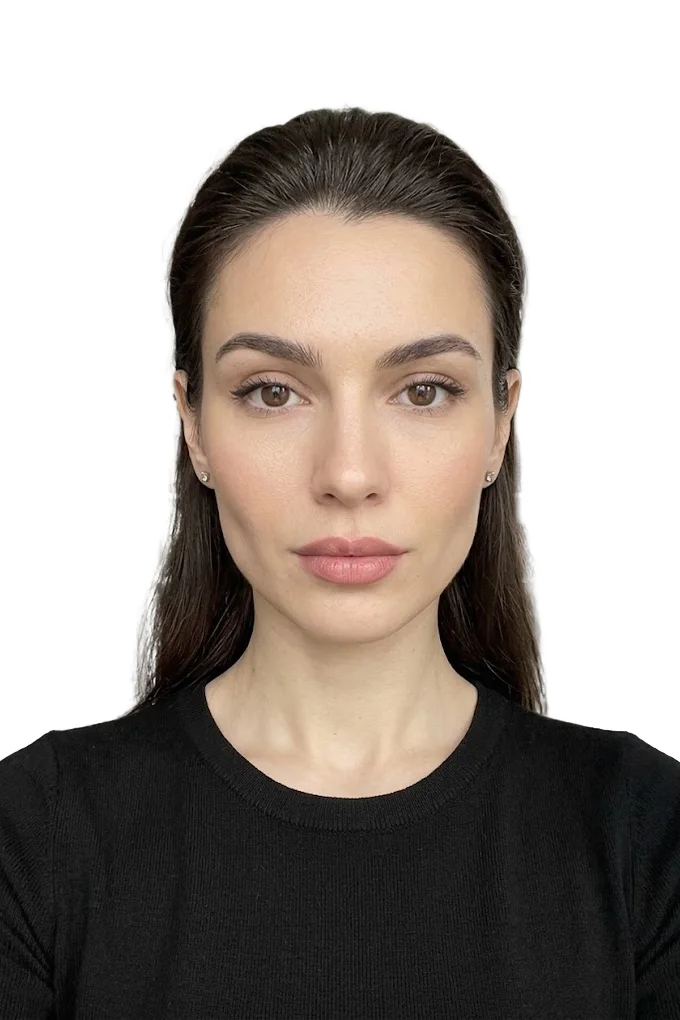 BeforeAfter⇆
- Bring back sharpness in the face and eyes
- Remove noise and artefacts without plasticising the skin
- Fix colour, contrast and a broken exposure
- Remove scratches, stains and creases from an old scan
- Return a file large enough to print
- Price per photo$10
- Turnaroundwithin 24 hours
- Deliveryto your email
- If we cannot do itmoney back
We will finish your photo by hand
A studio retoucher fixes what automation cannot: sharpness, face, colour, defects. Pay first, then simply send the photo and tell us what you need. If we cannot do it, you get your money back.
- Manual photo retouching$10
Photo ID UK: accepted documents, voter certificate and digital photo code
In the UK, photo ID is not a separate document but any document with a photograph from an approved list. There is no single compulsory identity card in the country, so the question of what to show comes up at the polling station, and the question of what picture to supply comes up when you apply for a passport or a voter certificate.
Photo ID UK list: what is accepted at the polling station
At a polling station the following are accepted:
- a passport issued by the UK, an EU or EEA country, or a Commonwealth country;
- a photo driving licence, British or issued in the EU or EEA;
- a national identity card of an EU or EEA country;
- a card with the PASS mark, a Blue Badge, a biometric residence permit;
- Ministry of Defence identity cards and the veteran card;
- concessionary travel passes for older and disabled people, including the Freedom Pass and the Oyster 60+ card;
- the Voter Authority Certificate, a free certificate for voters.
You show the original. A picture of the document on your phone or a photocopy is not accepted.
Expired photo ID UK rule: the likeness is what counts
An expired document is accepted as long as you can still be recognised from the photograph. The rule is put simply: the photo must look like you.
If you have no document from the list, if your appearance has changed a great deal, or if the name on the document does not match the electoral register, you apply for a Voter Authority Certificate. It is free, and you can apply online or on paper through your local council. You have to be a registered voter to apply, and you are usually asked for your National Insurance number.
Photo ID UK voter certificate: the photo you need to supply
You need a close-up of the head and shoulders, full face, looking at the camera, against a plain light background. The requirements are close to those for a passport.
| How you apply | Photo size |
|---|---|
| Online | at least 750 pixels high and 600 pixels wide, file up to 20 MB |
| Paper form | at least 45 mm high and 35 mm wide, no larger than 297x210 mm |
The picture is in colour and sharp, with no red eye and no glare or shadows covering the face. Only the applicant is in the frame. A head covering is acceptable for religious or medical reasons. The photo must be a true likeness, with no edits or processing. The certificate is valid for as long as you resemble your photograph, and it does not lapse when you move house.
Photo ID UK digital code from a booth or a shop
A photo code is a way of passing the passport office a digital picture taken in a photo booth or a photo shop. You are given a code, and you enter it in the online passport application instead of uploading a file.
Points to bear in mind:
- you need to get the code before you start the application;
- according to the passport office itself, photos from a booth or shop are approved more often than those people take themselves;
- the date limit is the same: the picture was taken in the last month.
The passport office page does not state how long the code itself stays valid or what format it takes, so ask about that where you have the picture taken.
Photo ID UK digital picture: how to take it yourself
The second route is to take the picture with your own device during the application. The passport office warns that you will need someone to help, which means a selfie will not do.
A short checklist based on the office's rules:
- Stand in front of a plain light-coloured wall, with no pattern and no objects.
- The helper frames you so that the head, shoulders and upper body are in the shot.
- Look straight ahead, mouth closed, no hair across the eyes; take your glasses off if you can manage without them.
- Check that there are no shadows on your face or behind you.
- Make sure the file is at least 600x750 pixels and weighs between 50 KB and 10 MB.
Turn off filters and portrait enhancement in the phone camera beforehand. If the file turns out soft or noisy because the room was dim, it is better to retake it by a window than to sharpen it afterwards: our article on how to improve photo quality explains what can and cannot be recovered from a weak original.
Photo ID UK formats in the online tool
The tool on this site has two UK formats. "United Kingdom: passport (online application)" produces a file of 900x1125 pixels weighing between 50 KB and 5 MB, which sits inside the passport office limits of at least 600x750 pixels and 50 KB to 10 MB. The second UK format is 35x45 mm at 600x800 pixels.
Keep the rule on editing in mind. The UK requires a picture that has not been altered by computer software, and the tool sets the background and corrects the white balance. So for a UK passport, take the picture against a real plain light wall and treat the tool as a way to crop the frame and bring the pixel size and file weight within the limits. We do not promise that a file with a replaced background will be accepted.
Voter ID photo in India, Indonesian and Dutch ID card photo rules
Three more documents are searched for constantly and follow their own logic: the Indian voter ID, where the photo goes on a form; the Indonesian KTP, where the office takes the picture and the background colour depends on your year of birth; and the Dutch identity card, which is checked against a published table of criteria.
Voter ID photo in India: size and background under Form 6
The guidelines to Form 6 of the Election Commission of India say: a recent colour photograph of good quality, passport size, 4.5x3.5 cm, on a white background, with no signature on the picture. The eyes are open and both edges of the face are clearly visible.
The photo is pasted into the box provided on the form. Form 6 is the application for inclusion in the electoral roll; the finished voter card with a photograph (EPIC) is sent free of charge by post to the address given after registration.
Voter ID photo online: what the file should be like
When Form 6 is submitted through the voters' portal, the photo is uploaded as a file. The requirements for the image are the same: white background, full face, open eyes, a recent picture.
We did not find exact limits on weight and pixels in the official guidelines: the figures that circulate online come from third-party sites and do not agree with each other. Go by the hint next to the upload field in the form itself. If the portal rejects the file as too heavy, reduce it without changing the 3.5 to 4.5 proportions; the methods are described in our guide on how to reduce photo file size without losing quality.
Indonesian ID card photo: red or blue background by year of birth
The background colour on the Indonesian electronic identity card, the KTP, depends on the year of birth: people born in an odd year get a red background, people born in an even year get blue. This is how Dukcapil, the population registry authority, explains it. You cannot choose the colour.
| Year of birth | Background on the KTP |
|---|---|
| odd (1991, 1993, 1995) | red |
| even (1990, 1992, 1994) | blue |
You do not bring a picture for the KTP. A Dukcapil officer takes it at the office while recording biometrics: photo, fingerprints and iris. So there is no file or print to prepare for the card itself; it is enough to arrive looking tidy and without glasses that reflect light. The card is issued to residents from the age of 17 and to those who are or have been married; you bring the family card (Kartu Keluarga). Check the exact list of documents on the website of your regional Dukcapil office.
The photo on a KTP can be replaced, but for a reason and not on request. Regional Dukcapil offices name these grounds: a lasting change in appearance after an injury, illness or surgery, and also when a person has started wearing a hijab. The officer takes a new picture on the spot and the card is reissued. You need the current KTP, the family card and a supporting document such as a medical certificate.
Indonesian ID photo sizes 2x3, 3x4 and 4x6 for forms and applications
Indonesians often carry the red and blue rule over to the ordinary small photos attached to forms, job applications and school documents, but there the colour is set by the organisation that accepts the papers, so ask it which one it wants. The usual sizes are 2x3 cm, 3x4 cm and 4x6 cm.
The online ID photo tool has all three sizes, each on a red and on a blue background, with a file of up to 200 KB. You choose the size and colour from the list; a custom size cannot be entered. As with every other format, processing and the preview are free and the clean file for download is paid.
Dutch ID card photo: size 35x45 mm and face measurements
The photo for the Dutch identity card and for the passport is the same: 35 mm wide and 45 mm high. It is checked against the photo matrix (Fotomatrix Model 2020), an official table of criteria with sample pictures.
| Parameter | From age 11 | Up to and including age 10 |
|---|---|---|
| Frame size | 35x45 mm | 35x45 mm |
| Face from chin to crown | 26-30 mm | 19-30 mm |
| Width of the face, ear to ear | 16-20 mm | 16-20 mm |
The head must be visible in full and centred in the frame. There is one allowance: with very voluminous hair, the hair may not fit in completely.
Dutch ID card photo: background, light, glasses and head covering
The background is grey, light blue or white: even, one colour, with sufficient contrast to the head. The light is uniform, with no shadows on the face or the background, no overexposure and no glare.
Pose: head straight, no tilt, eyes on one horizontal line, shoulders level. The look is neutral, straight at the camera, mouth closed. The face and eyes are fully visible.
Glasses are allowed on three conditions: the eyes are fully visible, the lenses are fully transparent, and there is no disturbing glare or shadow from the frame.
The head is uncovered. A covering stays on for religious or philosophical reasons, with the face left open. A third exception covers objective physical or medical reasons that prevent a person from meeting all the criteria; where there is reasonable doubt, a statement from a doctor or a medical institution may be requested.
Dutch ID card photo print: 400 dpi, no editing, and children under 6
The photo matrix requires a colour picture with natural colour rendering, sharp, with sufficient contrast and detail. The print is made on good-quality smooth photographic paper at a resolution of at least 400 dpi. It must not be damaged, must not be a copy and must not be edited.
Age of the photo: no older than 6 months on the day of the application.
Because of the "not a copy" and "not edited" items, the more reliable route for Dutch documents is to go to a photographer who knows the photo matrix, or to take the picture yourself against a real grey, light blue or white background and print it without changes. The tool on this site has a "Netherlands: passport / ID card" format of 35x45 mm, but it gives a single photo in a file, with no sheet for printing, and it sets the background by software, which is exactly what the matrix warns against.
For children under 6 the photo matrix drops the requirements for pose and expression: the child does not have to look at the camera or keep a neutral face. One condition remains: any support must not be visible in the frame, so no hands and no adult behind the child. The face of a child up to and including age 10 may be smaller than an adult's, from 19 mm.
Voter ID photo, Indonesian and Dutch photos side by side
| Document | Who takes the photo | Size | Background |
|---|---|---|---|
| Voter ID, India | you, pasted on Form 6 or uploaded | 4.5x3.5 cm | white |
| KTP, Indonesia | the Dukcapil officer | not prepared by the applicant | red for an odd year of birth, blue for an even year |
| Indonesian photos for forms | you or a studio | 2x3, 3x4 or 4x6 cm | red or blue, as the organisation asks |
| Dutch passport and ID card | you or a photographer, as a print | 35x45 mm, face 26-30 mm | grey, light blue or white |
The pattern is the same as in the rest of this guide: the face rules barely change from country to country, while the size, the background and the way the picture reaches the authority have to be checked for each document separately.
Frequently asked questions
Which ID photo requirements are the same in every country? A full-face view, a neutral expression, mouth closed, eyes open, even light with no shadows, a plain light background, a recent picture with no retouching or filters, and only you in the frame. The size, the background colour, the rule on glasses and the age limit are set separately for each document.
Can you smile in a passport photo? No. The USA, the UK and the Netherlands require a neutral expression and a closed mouth. An exception is made for small children: in the UK and the Netherlands the expression of a child under 6 is not assessed.
Is a white background right for any ID card photo? No. White suits a US passport, the Indian voter ID and Dutch documents. A printed UK passport photo is expected on a cream or light grey background, and the Indonesian KTP uses red or blue.
Is expired photo ID accepted in the UK? At a polling station, yes, as long as you still look like the photo in the document. You need the original: a picture of the document on your phone or a photocopy will not be accepted.
Do I need to bring my own photo for an Indonesian KTP card? No. The photo for the electronic KTP is taken by a Dukcapil officer at the office, together with your fingerprints and an iris scan.
What size is a voter ID photo in India? Under the guidelines to Form 6: 4.5x3.5 cm, in colour, on a white background, with no signature on it, eyes open and both edges of the face visible.
Can I wear glasses on a Dutch ID card photo? Yes, if the eyes are fully visible, the lenses are fully transparent and there is no glare or shadow from the frame. Tinted lenses will not do.
Can the background of a photo ID card picture be replaced with software? It depends on the document. The USA, the UK and the Netherlands expressly forbid altered or edited pictures, so for them take the photo against a real plain background. Where there is no such ban, bringing the background to white is acceptable, but the face, hair and clothing may not be changed anywhere.
We will edit a sample from your catalog for free
For online stores, manufacturers, brands and wholesale suppliers. Send 1-3 product photos and we will return them professionally edited, with a price quote for your whole catalog.
This is a b2b, volume format. We do not process personal photos (portraits, events, documents) here.
Request received
We will edit your sample and send the result with a catalog quote within one business day.